Burning Cards & Dust
Sometimes clearing out your collection can help your favourite cards shine even brighter!
Learn how to burn unwanted cards for resources such as Dust, and how to check your selection before permanently destroying cards.
01 How Burning Works
▸ Burning a single card:
k!burn <card code>kb <card code>Example: kb abc123
Replace abc123 with the card code you want to burn.
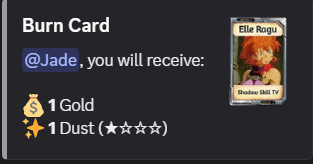
※ Warning: Burning permanently destroys the card. Once burned, it cannot be recovered.
02 Understanding Dust
The condition of the burned card determines the type of Dust you receive.
| Card Condition | Dust Received |
|---|---|
| Mint | Mint Dust |
| Excellent | Excellent Dust |
| Good | Good Dust |
| Poor | Poor Dust |
| Damaged | Damaged Dust |
Dust is used alongside Gold when upgrading cards through the normal upgrading process.
Upgrade Orbs provide an alternative that doesn't require Gold or Dust. See ♤ Card Upgrading & Upgrade Materials for details.
03 Burning Multiple Cards
You can burn multiple unwanted cards using the Multiburn command.
▸ Burning multiple cards:
k!multiburn <card codes>kmb <card codes>Example: kmb abc123 def456 ghi789
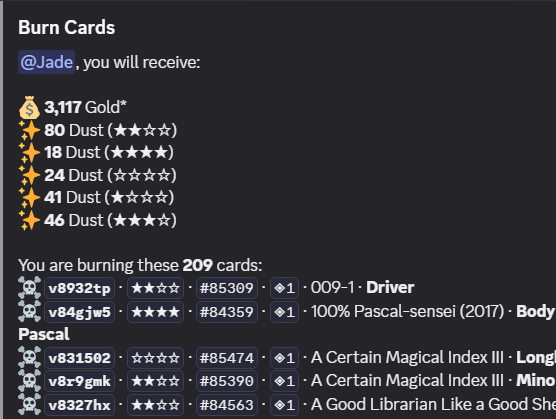
Enter the codes of the cards you want to burn, separated by spaces.
Always double-check every card code before confirming a multiburn. All selected cards will be permanently destroyed.
04 Burning Safely
Before burning, always review the cards you've selected.
▸ Checking your Burn tag:
kc t:burn
This displays the cards assigned to your Burn tag. Go through the collection carefully to make sure no valuable or wanted cards were added by mistake.
▸ Additional precautions:
- Check print numbers, editions, and wishlist counts.
- Remove any cards you want to keep from your Burn tag.
- Double-check all card codes before confirming a burn.
A Burn tag is only an organizational label. Tagging a card doesn't automatically burn it.